Posts

How to set Alias for Laravel in ubuntu?

There are following steps for setting the aliases: 1. To begin with, open the bash terminal and head to the home directory. 2. Then, check if there is a .bash_aliases file: ls -a 3. In case the file does not exist, we have to create it: touch .bash_aliases 4. Open the file with a text editor and add the alias. For example: alias pa='php artisan' 5. Then, save the file and exit. 6. Restart your terminal and try in your project root directory with pa Some Aliases: alias pa="php artisan" alias pas="php artisan serve" alias pac="php artisan cache:clear" alias paoc="pa optimize:clear"

IonCube Loader Install For Vtiger CRM Projects in Local System || Mac OS...

Image
For IonCube Loader Install For Vtiger CRM Projects in Local System, just watch the below video:

How to choose right backend technologies?

For the developers, when we get new requirements of the project and that contains requirements of the backend.    At that time we were confused about choosing  the right backend technologies.    So I also experienced the same thing and got the solution from this blog. https://iamprafful.medium.com/how-to-choose-the-right-backend-39a7ac32e1     Hope you can also get the help from this for choosing the right backend technologies.

How to install magento in easy steps?

Image
Magento is very easy to install. So below are the prerequisite for installation: 1. The PHP version must be required 7.4 version or higher than it. 2. Below extension must be enabled: ext-bcmath, ext-ctype, ext-curl, ext-dom, ext-gd, ext-hash, ext-iconv, ext-intl, ext-mbstring, ext-openssl, ext-pdo_mysql, ext-simplexml, ext-soap, ext-xsl, ext-zip, lib-libxml Now, start exactly how to install magento and setup. So below are the steps for that: 1. First of all need to install composer. For that visit below link:    https://getcomposer.org/download/ 2. Create the DB to MySQL. For Example magento2.3.7 3. Donwload the magento 2.3.7 (You can also download the higher version.) version source code from below link: https://magento.com/tech-resources/download 4. Now set the database details, magento front and admin related details to below commond and run this commpond to commond promt to your current magento project directry path:   For ex. of path:  D:\xampp\htdocs\mage...

How to install Angular to local machine?

  For installation of Angular to local machine refer the below link:    https://angular.io/guide/setup-local

How to see unused variables in Visual Studio Code for AngularJs?

 Looking for the unused variables in VS code editor, need to add below line to tslint.json file  under "rules" add "no-unused-variable":true

What is a Good Load Page Time?

 2 seconds time is Good Load Page Time.

How to Build an AngularJs App?

 For creating build in Angular Js, run the below command in project directory:   ng build --prod --aot --output-hashing=all

How to set and get log in MySQL?

Using below MySQL statement, we can set and get the MySQL log: For getting the log, we must need set global log using command as below: SET global general_log = 1 ; Now need execute command using storing output:     SET global log_output = 'table' ;   Now you can see the log using below query: SELECT * FROM mysql.general_log; If you want to disable log, then need to run below query:      SET global general_log = 0 ;

How to increase the security for login and prevention for SQL injection in PHP?

Sometimes developers are set the user name and password directly to query without using any plain text checking function like addslashes() of PHP function or mysqli_real_escape_string()  of mysqli functions for entered username and password by user. And some time end uses are setting the password very poorly like set our simple name or birthday and name etc. So we need care about below things: For end user, password should not be be your personal details like birth date or your first or last name. For developer, Should to set restriction like allowed three wrong attempts after that block the user for 24 hours. From preventing SQL injection, Should to add addslashes()  for PHP and for My SQL  mysqli_real_escape_string() before executing the query to database. Understanding with examples: <?php /* For query */ $con = mysqli_connect ( "localhost" , "user" , "password" , "dbname" ); $user_name = mysqli_real_escape_string( $c...

Changing upload_max_filesize on PHP

Using below lines, we can set the upload_max_filesize at run time in php: First of all you need to check current set upload_max_filesize: <?php echo "Upload max file zise =  " . ini_get("upload_max_filesize") ; ?> Now set the upload_max_filesize 200 MB: <?php ini_set('upload_max_filesize', '200MB'); ?> Now check the changed size: <?php echo "Upload max file zise =  " . ini_get("upload_max_filesize") ; ?> We can also get and set the post_max_size as per above example.

How to get the Time Zone from IP address in PHP?

Using below PHP script, we can get the time zone based on IP address: $ip = '192.168.11.121';  # any working IP address $ipContent = file_get_contents('http://ip-api.com/json/' . $ip); $ipJsonInfo = json_decode($ipContent); $timeZone = $ipJsonInfo->timezone; #Print the $timeZone echo $timeZone; Here, also can set this time zone as default using below function: date_default_timezone_set($timeZone);

What is fully qualified name in MySQL database query?

 In query the field name aliased  by table name know as Fully Qualified name. Ex. SELECT employee.address FROM employee;

What is conjunctive operators in SQL?

 The SQL AND and OR conditions may be combined to test multiple conditions in query. These two operators are called conjunctive operators.

How to generate the random password in PHP?

 Using below PHP script, you can generate the random password: <?php  function generateRandomPassword() {         $salt = "abcdefghijklmnopqrstuvwxyz0123456789";         srand((double) microtime() * 1000000);         $i = 0;         while ($i <= 7) {              $num = rand() % 33;             $tmp = substr($salt, $num, 1);             $pass = $pass . $tmp;             $i++;         }         return $pass;     } echo generateRandomPassword();  // Calling the function ?>

How to use remote validation in JQuery?

 As per below example, we can use the remove validation into JQuery: email: { remote: { type: "POST", url: 'http://test.domainname.com/check_email.php', dataType: "json", beforeSend: function () {                                        // set loading image }, complete: function () {                                 // hide loading image }, data: { 'email': function () { return $('#email').val() } } } } Here, "check_email.php" is your remote file where you will verify the email. Which exist or not to your particular database table

How to set Timezone in .htaccess file?

Using below line, we can set the Timezone to .htaccess file. SetEnv AE Asia/Dubai

How to Drop or Delete the database by shell command in windows XAMPP?

 Generally, we can pass any query to mysql from shell with -e option as below: 1. First need to go in mysql/bin using cd mysql/bin command 2. mysql -u username -p -D "database name" -e "DROP DATABASE database name"

How to add new file in git ignore?

 For steps to add file in git ignore: 1. Go to .gitignore file and add the entry for the files or folder path you want to ignore. 2. git rm -r --cached . 3. git add . Note:  Whenever you find the file which is in git ignore file and still you are getting in git status then run the command as above. 

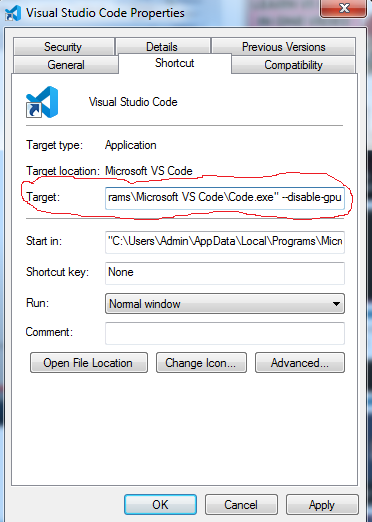
VS Code displaying black on screen at launching time

Image
Just need to run this command on command prompt: code --disable-gpu But here every time need to open the VS code using this command, So I think this is the time consuming process. So the permanent solution is as below: - Right click on Vs code shortcut on desktop and select the Properties - write the --disable-gpu command in target at end of the path with after space. See in the below screenshot: